All your AI agents on one board, and in your pocket.
ORCA shows what every agent is doing at a glance, alerts your phone when one needs you, and lets you answer with a tap. Free, open source, on your own computer.
What ORCA stands for:
- Orchestrate your agents on one board
- Reply from your phone
- Check every status at a glance
- Approve drafts before they go out
Install on Linux, macOS or Windows (WSL2)
curl -fsSL https:/Node.js 20 or newer. No account, no sudo. Install guide
 Built by Operio. Our own team runs its agents on it every day: from the desk and from the phone.
Several agents should not mean babysitting them
Four things that slow you down once more than one agent is running, and what ORCA does about each.
The problem:Agents stall while you are in another window
An agent asks a question, then sits idle for an hour because you never saw it.
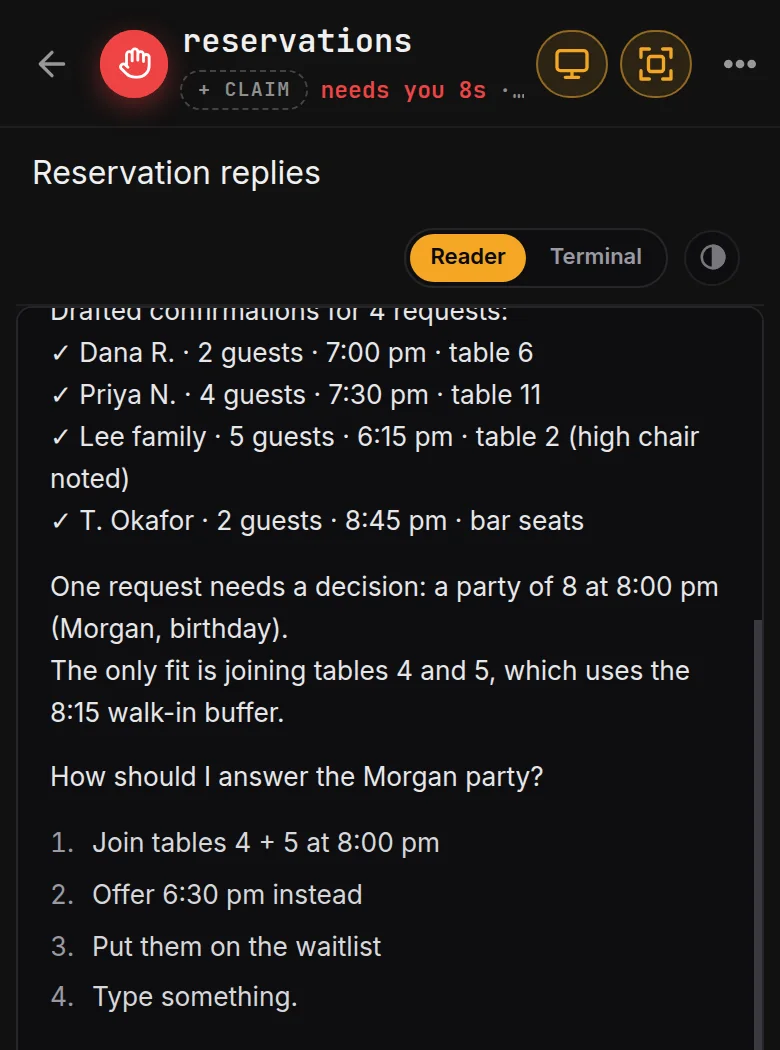
With ORCA:Your phone tells you, and one tap answers
When an agent needs a decision, its tile turns red and your phone gets a “needs you” alert. Pick an answer and it gets back to work.
The problem:Five agents, five tabs, no idea who is stuck
You click through terminals to find out who is working, who is done and who is waiting on you.
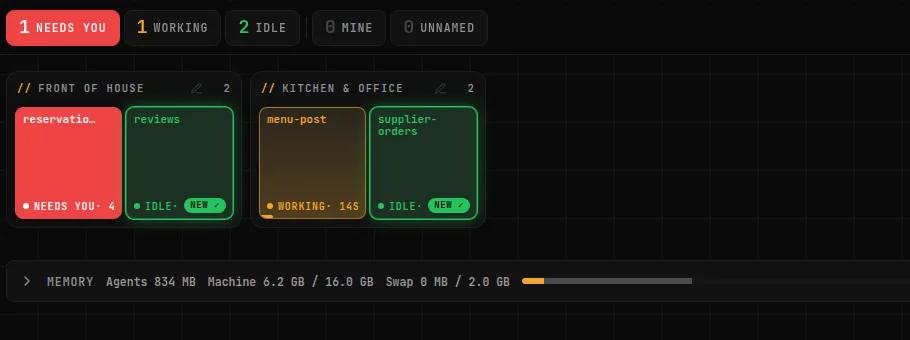
With ORCA:One live board for every agent
Each agent is a tile painted by its status: working, needs you, done. You read the whole team at a glance.
The problem:You can’t leave the desk while they run
Step away and the work stops, because the next question waits until you are back.
With ORCA:Run them from your phone
Read the output, reply, and start new agents from anywhere, over a private connection to your own computer.
The problem:The same instructions every morning, and drafts that go out unchecked
You retype the same tasks every day, and nothing stops a draft from leaving before you read it.
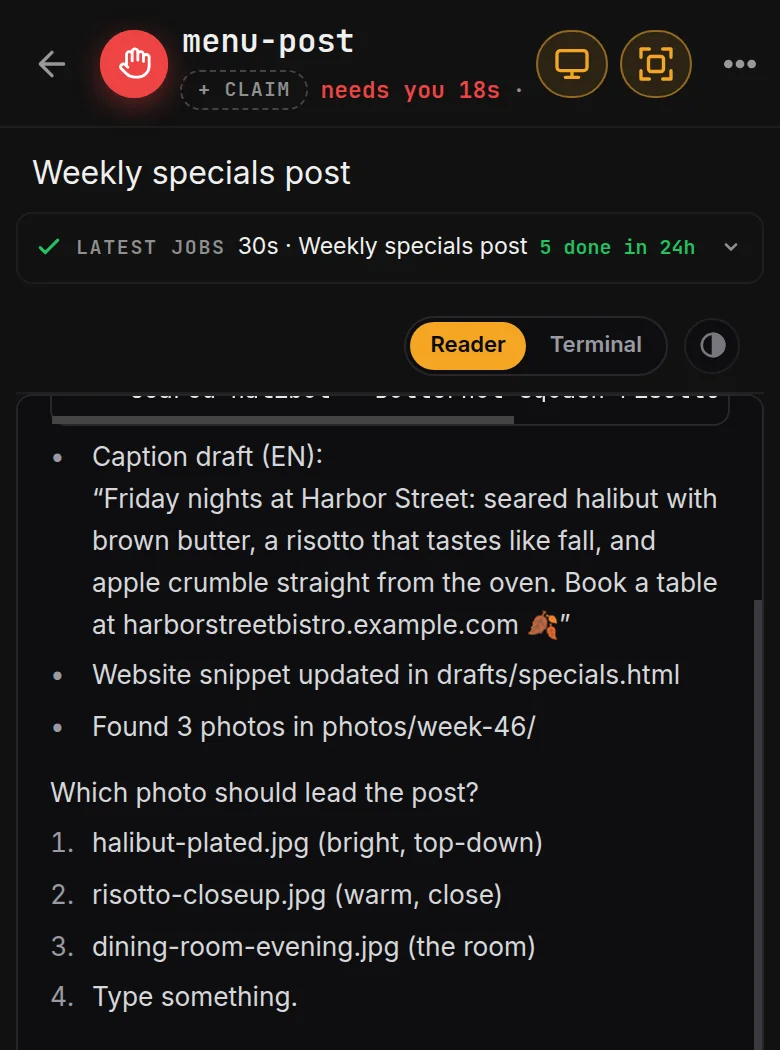
With ORCA:Scheduled routines whose drafts wait for your OK
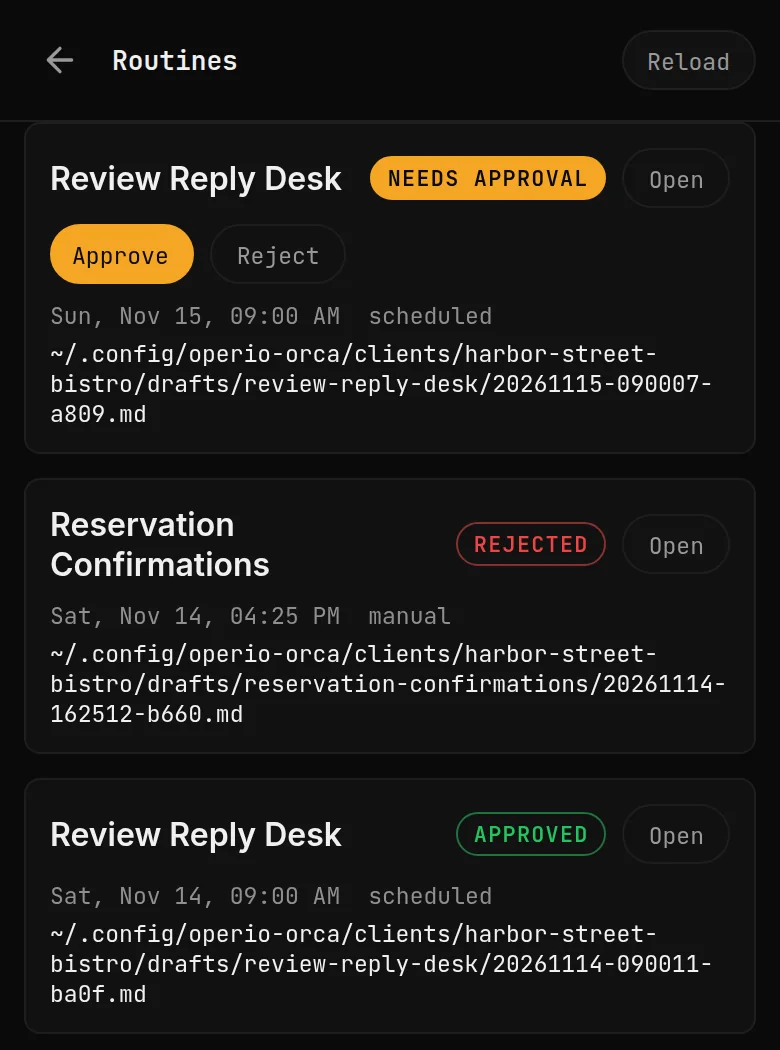
Save a task once and pick when it runs. What it writes waits in the Routines tab until you approve it.
How it works
-
Install it
One line in the terminal. It starts with your computer and opens in your browser at 127.0.0.1:7171.
-
Start your agents
Open Claude Code, Codex or opencode with the New button. Each one gets a tile on the board.
-
Answer from anywhere
Turn on phone alerts over a private connection. When an agent needs you, answer with a tap and carry on with your day.
What’s new in 0.2.0
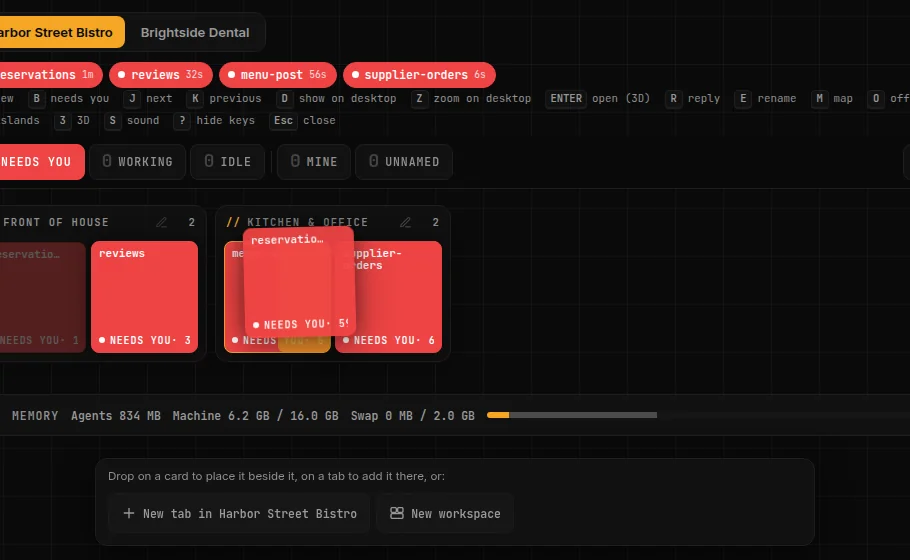
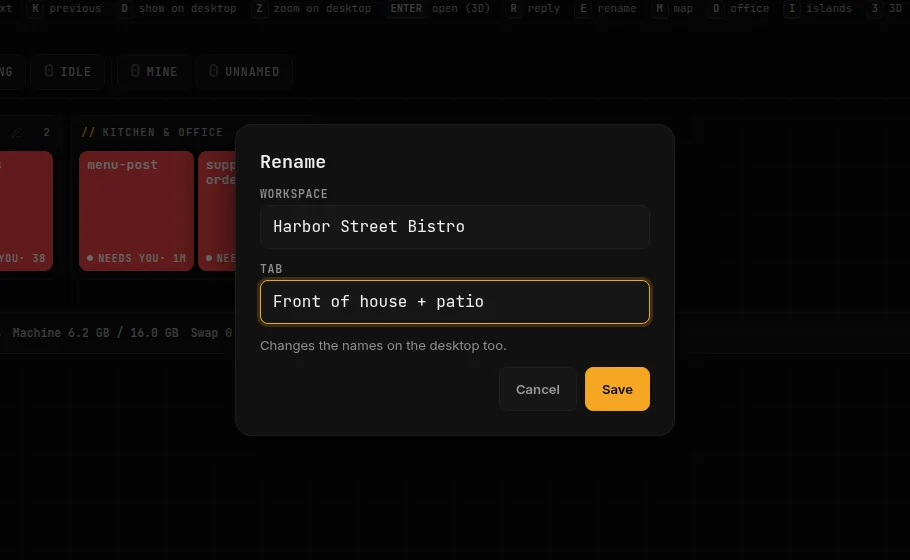
-
A map you can rearrange
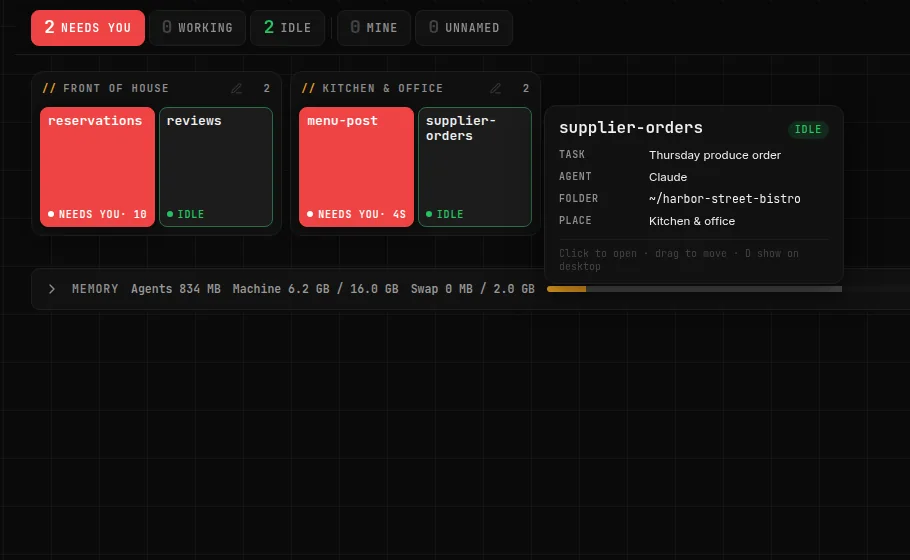
Drag an agent next to another one, onto a tab, or to the bar at the bottom for a new tab or workspace. Drag a box header to reorder, and rename workspaces and tabs from the pencil.
-
Office view is a tower
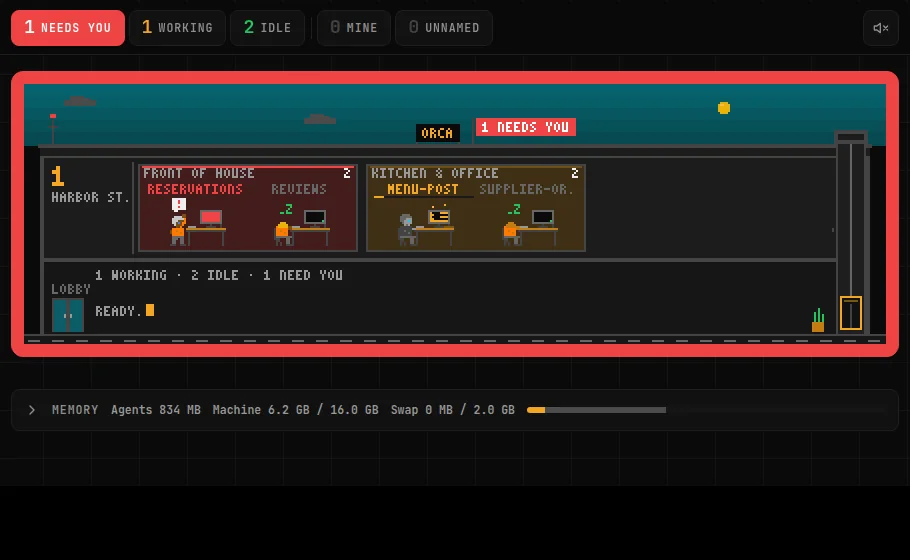
One floor per workspace, a lift that carries agents between floors, a red room and a flag on the roof when an agent needs you, and a sky that follows your clock.
-
A hover card on desktop
The task, the last reply, agent and model, folder and jobs at a glance.
-
Switch a Claude agent’s model from its card
Fable, Opus, Sonnet or Haiku, while the agent is idle.
-
API keys from the panel
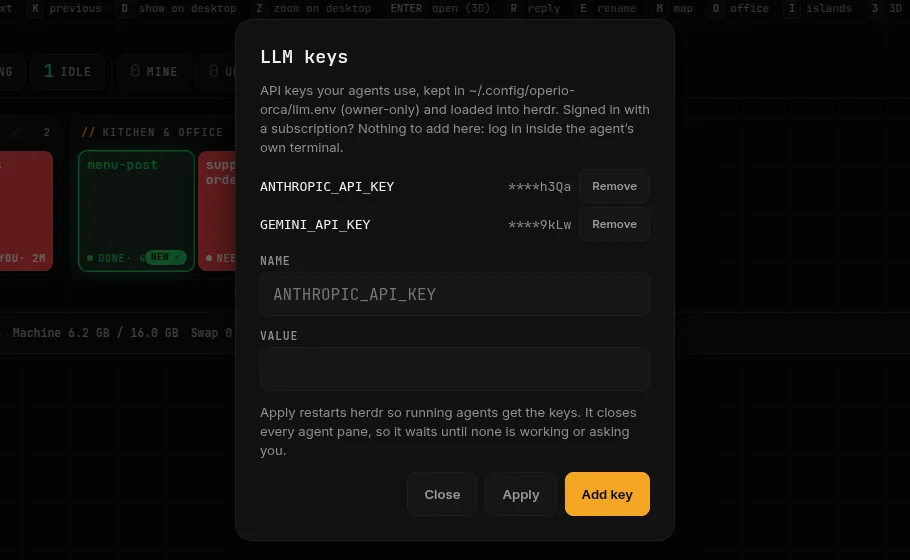
The key icon in the header adds or removes keys for your agents and applies them when no agent is working. Values are never shown back and never reach the log. Subscriptions keep signing in inside the agent, as before.
-
New commands
doctor (one line per check, with the fix), logs, open, backup and restore, and update --check.
-
Windows (WSL2) without systemd
The installer starts the panel by hand and prints the recipe that makes it start with Ubuntu.
Also new: the icon, and the header now reads “ORCA · by Operio”. Full changelog
Run a business?
ORCA also runs office routines on a schedule: a morning brief, review replies, a weekly report. They read the files you give them and write a report or a draft. Nothing reaches your customers until you send it.
Five routines, free
- Morning Front Desk Brief You start the day not knowing what is waiting: messages, bookings, reviews and overdue payments.
- Review Reply Desk Google reviews sit unanswered and hurt your ranking and your customers' trust.
- Weekly Owner Report You have no single view of last week's leads, bookings, reviews and money coming in.
- Showing Day Pack Agents lose an hour before every showing day putting together the route and the property sheets.
- Post-Visit Thank-You + Review Ask Happy customers leave without being thanked or asked for a review, so your best visits never show up on Google.
Want it to run on its own?
ORCA Managed by Operio runs 18 more routines for you. They connect to WhatsApp, your Google Business Profile and your booking tools, and send with the approvals you set. See the full catalog
| What you get | ORCA | ORCA Managed by Operio |
|---|---|---|
| Where it runs | Your own computer | Operio runs it for you |
| Who can use it | You, on your computer | Your team, with roles |
| Team chat | No | Threads per agent, a team room, EN/ES translation |
| Sending to customers | Never. You copy, paste and send | Yes, behind the approvals you set |
| Setup | You install it with one line | Operio sets it up with you |
| When something breaks | You check the log | Operio is watching and fixes it |
| Install free | Have Operio run it for you |
Agencies and consultants: offer managed routines to your clients and earn 25%. Partner program
Your own panel, run by Operio
The same ORCA, on a server Operio runs for you, with your team signed in.
Have Operio run it for you See every difference-
Your team, with roles
Admins run the agents, viewers follow along and comment.
-
Team chat
A thread on every agent and one team room, with alerts when someone mentions you.
-
Ask an agent from the chat
Write @agent and the message goes to it as work; its answer comes back in the thread.
-
English and Spanish
Messages in both languages, translated with one tap.
-
Operio keeps it running
Model access, updates and monitoring handled by Operio.
It stays on your computer
-
Only your computer can open it
It listens on localhost only, so nothing on the internet can reach it. There is no account with us.
-
Your files stay where they are
Drafts, reports and logs live in your home folder. The only service that reads your files is the AI assistant you signed in to.
-
Other websites are shut out
It ignores requests from other sites and asks you before it opens a terminal.
-
Your phone, privately
Reach it from your phone through a private network or an SSH tunnel. Never open it to the internet.
Questions
What does ORCA stand for?
Orchestrate, Reply, Check, Approve. Orchestrate your agents on one board, reply to them from your phone, check every status at a glance, and approve drafts before they go out.
Is it really free?
Yes. ORCA is open source under the MIT license, with no account and no trial period. The only cost is the AI assistant you already use.
Which AI agents does it work with?
Claude Code, Codex, opencode and other agents that run in a terminal. Install and sign in to them as usual; ORCA shows them, starts them and passes on your answers.
What do I need?
A computer with Linux, macOS or Windows (WSL2), Node.js 20 or newer, and at least one AI agent installed and signed in. For routines, the computer has to be on when they are scheduled. So far we have tested it on Linux; macOS and WSL2 are not tested yet.
Can I use it from my phone?
Yes, through a private network (Tailscale) or an SSH tunnel. The install guide shows both, step by step.
Will it message my customers?
No. Free routines only write reports and drafts, and you send them yourself. Sending on its own, with approvals, is what ORCA Managed by Operio does.
How can I see it before I set anything up?
Run operio-orca demo. It opens a second panel with two fictional businesses whose agents work, ask you questions and finish, with no real data and no cost.
Can my team use it?
The free panel is for one person on one computer. ORCA Managed by Operio adds people with roles and a team chat, and Operio runs it for you.
Put every agent on one board
One line to install. No account and no sudo.
curl -fsSL https:/